Overview
Amazon EKS Capabilities is a set of fully managed cluster features that accelerate developer velocity and offload the complexity of building and scaling with Kubernetes. Among these capabilities, the ArgoCD Capability provides a fully managed GitOps continuous deployment solution—eliminating the operational overhead of installing, maintaining, and scaling Argo CD controllers on your clusters.
Argo CD is a declarative, GitOps continuous delivery tool for Kubernetes. It follows the GitOps pattern where Git repositories serve as the single source of truth for defining the desired application state. Argo CD continuously monitors these repositories and automatically syncs the cluster state to match the desired configuration.
With the EKS ArgoCD Capability, AWS handles scaling, upgrades, and inter-cluster communications, while providing native integrations with services like Amazon ECR, AWS Secrets Manager, and AWS CodeConnections.
Hub-and-Spoke Architecture
A common deployment pattern is the hub-and-spoke topology: the ArgoCD Capability runs on a dedicated central EKS cluster (the hub) that serves as the control plane for GitOps operations, managing deployments to multiple workload clusters (spokes). This provides a single pane of glass to orchestrate deployments across clusters—whether they’re in different regions, accounts, or have private API endpoints.
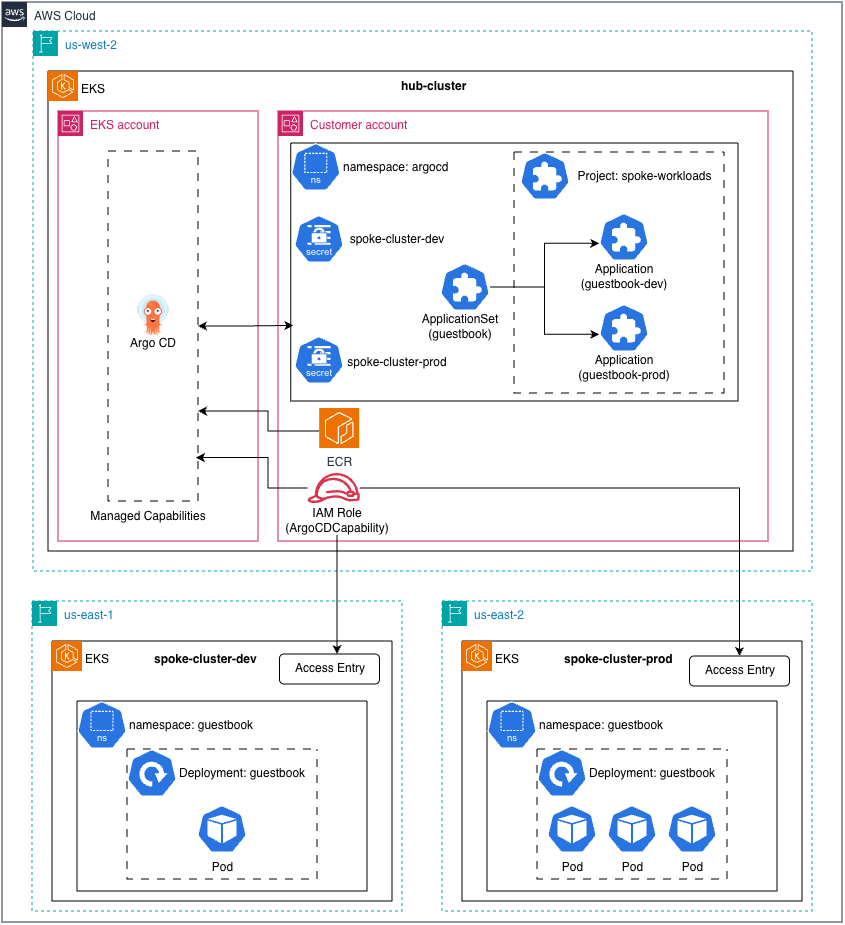 Figure: Hub-and-spoke topology for EKS ArgoCD Capability (Source: AWS Containers Blog)
This post focuses on registering a spoke cluster to an existing hub cluster with ArgoCD Capability enabled.
Prerequisites
- Hub cluster with ArgoCD Capability enabled
- ArgoCD Capability IAM role ARN (e.g.,
ArgoCDCapabilityRole) - kubectl configured for hub cluster
Step 1: Grant ArgoCD Access to Spoke Cluster
Create an access entry and associate cluster admin policy on the spoke cluster:
| |
Step 2: Create ArgoCD Project
Create a dedicated project for spoke workloads (skip if already exists):
| |
To add more clusters to an existing project:
| |
Step 3: Register Cluster via Secret
Create a Kubernetes secret to register the spoke cluster:
| |
Important: The
serverfield must be the EKS cluster ARN, not the Kubernetes API URL or IAM role ARN.
Step 4: Deploy Application
Create an ArgoCD Application targeting the spoke cluster:
| |
Quick Reference
| Field | Value | Note |
|---|---|---|
server in Secret | EKS cluster ARN | arn:aws:eks:<region>:<account>:cluster/<name> |
destination.name | Cluster secret name | Not the server URL |
sourceNamespaces | argocd | Required in AppProject |
Troubleshooting
Application stuck in Unknown status
Check if the project allows the application:
| |
If you see “not permitted to use project”, ensure sourceNamespaces: [argocd] is set in the AppProject.
Cluster not reachable
Verify access entry exists:
| |
Verify access policy is associated:
| |
Force refresh application
| |